What's new
GrowWeedEasy.com
You're browsing as a guest. Sign up to join the conversation, share your grows, and get help from thousands of fellow growers — it's free and takes less than a minute.

Macro shots

Friedumpling

New member
Now that my main girl is on her way in flower, I decided to start polishing up my macro skills. I’m trying out a program that does “photo stacking”. You take multiple shots, changing the point of focus in each one. Then the program stacks the images, using only the in focus parts of each shot.

This is only my second attempt. You can see spots that are not in focus, basically meaning, I need to reduce the change in focus between shots even more.

 

Attachments

  • photo59550.jpg
    photo59550.jpg
    3.1 MB · Views: 0
Howdy Frieddumpling, Great photo! What is the program, that You used for the photo, Is it an app for a smart phone, or a photo editor program like Paint Shop? I have been using a 'clip-on' lens on my iPhone to take close-ups, but the limited focal plane allows for limited clarity in the photo. I would like to know mort about the software.
 
VERY nice photo. Yes, what program are you using? I'm using a loupe with either my phone or camera, and neither one gets as clear as I'd like.
 
Thanks for the comments!!

I’ve been using a program called Helicon Focus, $30 for a 1yr license and they offer a 30 day free trial. It’s designed for photo stacking so it’s extremely easy to use. Just drag photos in and click go.

As for the camera, I am using a Nikon mirrorless with an actual macro lens, so I wouldn’t expect a cellphone to be able to produce the same results.

When I originally made this post, I had an idea for using smartphones, but I don’t have a clip on lens.

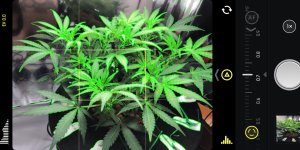
There is a smartphone camera app I use called “Halide”. It shoots in raw, so your images get a lot more detail and there is an easy way to switch to manual focus. You can then turn on this focus overlay that highlights what you are currently focused on. I attached a screenshot from my phone to show the focus overlay (highlights in green).

At the very least, I feel you would need:

smartphone w/ macro lens
halide camera app
helicon focus for computer
tripod with cellphone attachment

Crap... now I want to buy a smartphone lens to see what’s capable there...
 

Attachments

  • photo59655.jpg
    photo59655.jpg
    393.5 KB · Views: 1
Last edited:
Friedumpling thanks for this thread. It inspired me to look at my phone and it's camera

Samsung Galaxy S7
I dumped the Samsung camera app long ago and downloaded "Open Camera", way more features (specifically for date stamping)

today, I looked and found it included a Macro setting.
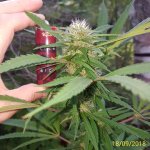
Took some shots of an outdoor plant
with naked eye, I can see the 'frost' starting to come in.
I was pleasantly surprised at the picture
​​​​​​​
 

Attachments

  • photo59887.jpg
    photo59887.jpg
    706.2 KB · Views: 0
Nice! Glad to hear it!

That photo does look great!

I already have a cellphone macro lens in my amazon cart, once I get some time with that I’ll post again with results. Hoping to get something nice with that combo. Cellphones might not have all the quality but the cost is much better (using something you already own) and the convenience is amazing too.
 
Thank you so much for the Halide App info. I’ve been using my Canon SLR for tent (LED magenta color) and then editing in photoshop. Can’t wait to try the app in 8+ iPhone. Great info-thanks again.
 
Back
Top