GrowWeedEasy.com
You are using an out of date browser. It may not display this or other websites correctly.
You should upgrade or use an alternative browser.
You should upgrade or use an alternative browser.
how to post like a pro
- Thread starter duckman
- Start date


Tersky
New member
Are you wanting to change your avatar pic or are you asking how to get other peoples pics to show up when doing and "@"?
To change pic, go to your profile by clicking on your name in the upper right then click on "Edit Avatar" on the left side then follow the prompts.
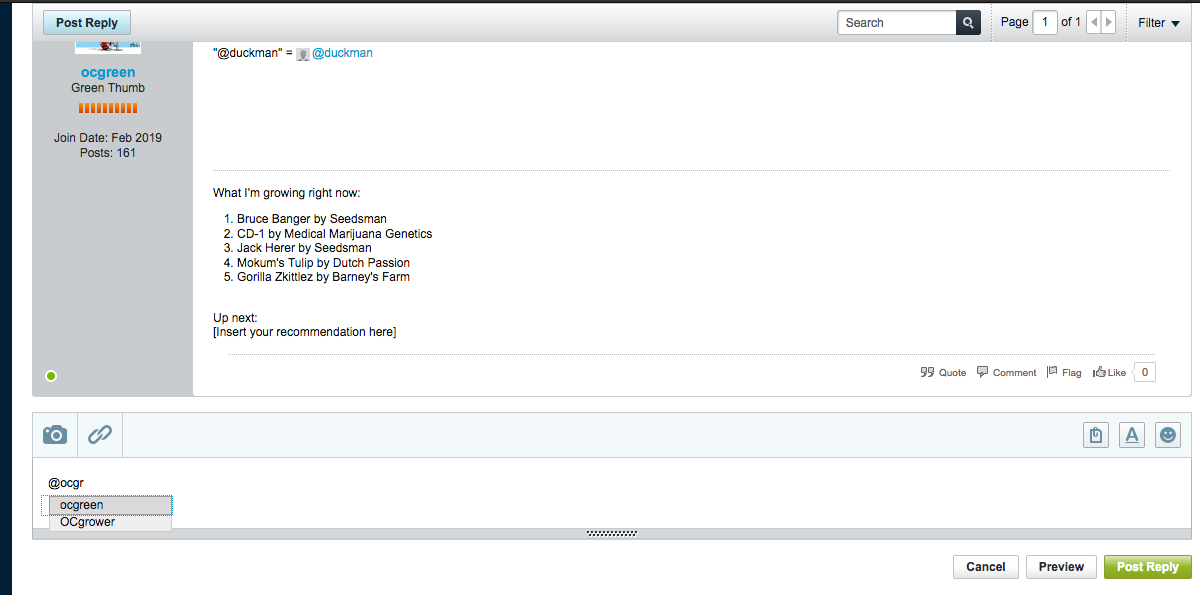
To tag someone type "@" then start to type user you want to tag and after a few letters an auto-complete box will pop up with a list of names corresponding to the letters you have typed. When you see the user name you want to tag click on it and it will auto populate. For example, i type "@" "d" "u" "c" then the box pops up and i click "duckman" and i get duckman
Hope this answers your question!
To change pic, go to your profile by clicking on your name in the upper right then click on "Edit Avatar" on the left side then follow the prompts.
To tag someone type "@" then start to type user you want to tag and after a few letters an auto-complete box will pop up with a list of names corresponding to the letters you have typed. When you see the user name you want to tag click on it and it will auto populate. For example, i type "@" "d" "u" "c" then the box pops up and i click "duckman" and i get duckman
Hope this answers your question!

9fingerleafs
Well-known member
i get a member list when i start typing after the @. im on a lap top