What's new
GrowWeedEasy.com
You're browsing as a guest. Sign up to join the conversation, share your grows, and get help from thousands of fellow growers — it's free and takes less than a minute.

Been tryin to upload pics

purpleman

New member
It's been frustrating. I am to the end of my most successful grow, and can't wait to share pictures and details, but I simply can't make it work. I've tried several different times. Anyway, Today is day 50 in flower. The breeder said 50 days on Black Domina, 55 on Blue Monster, and 60 on Girl Scout Cookies. The first two both look cloudy (no amber yet), and I think I'm gonna pull them up. If somebody wants to help me figure out how to resize my pictures I'd love to post!
 
I've been having the same problem but I did read a thread that was started in regards to this issue ..one of the solutions would be to take a screen shot of the image..is it an image size issue your having?..if it is then the screen shot will work .
 
Using windows..download the pics into a folder. Open the folder, right click on the pic you want to post and open with "paint" Then you have to crop the picture---Most likely the height has to be reduced to 3400 and saved. Then you can post it to the thread. It's a pain in the ass, since they updated the format. A standard vertical iphone pic is to tall now.
Hope that helps...see the dimensions shown on the warning note when it refuses. You have to resize smaller than those dimensions
 
yeah, it's a size issue. I've tried using the thing on the website that it recommends using "if you have trouble uploading pics", but the pics are still too big. I'll mess with it some more. I've been proud of the success I've had with this grow. It's all thanks to you guys. When I topped my plants, I used the tops to create clones, and they are JAMMING OUT! I've taken clones from my clones now (just 2), and they look great too!
 
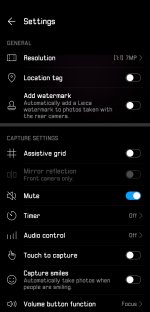
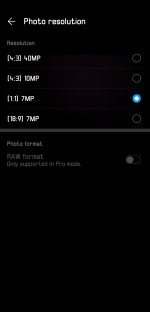
If your using a newer phone you can go into the camera settings and lower picture quality. You go into settings, go to picture quality and lower to the lowest setting you have. More square the pic is the better. 1:1. Is better than 4:7. Wide or long pics won't load. I had the same problem with my phone because it takes 40 megapixel photos with the triple camera,I was cropping photos to get them to post until I figured this out.
hope it helps.
 

Attachments

  • photo103146.jpg
    photo103146.jpg
    225.3 KB · Views: 0
  • photo103147.jpg
    photo103147.jpg
    120.8 KB · Views: 0
Back
Top